
Release note · v1.10.2
Better audio. Smoother sync.
Quiet recordings come through clearer, you can see a recording without unlocking, and you feel when things happen. Plenty of goodies to start the new year.
iOS build 43 · macOS build 86 · watchOS build 43
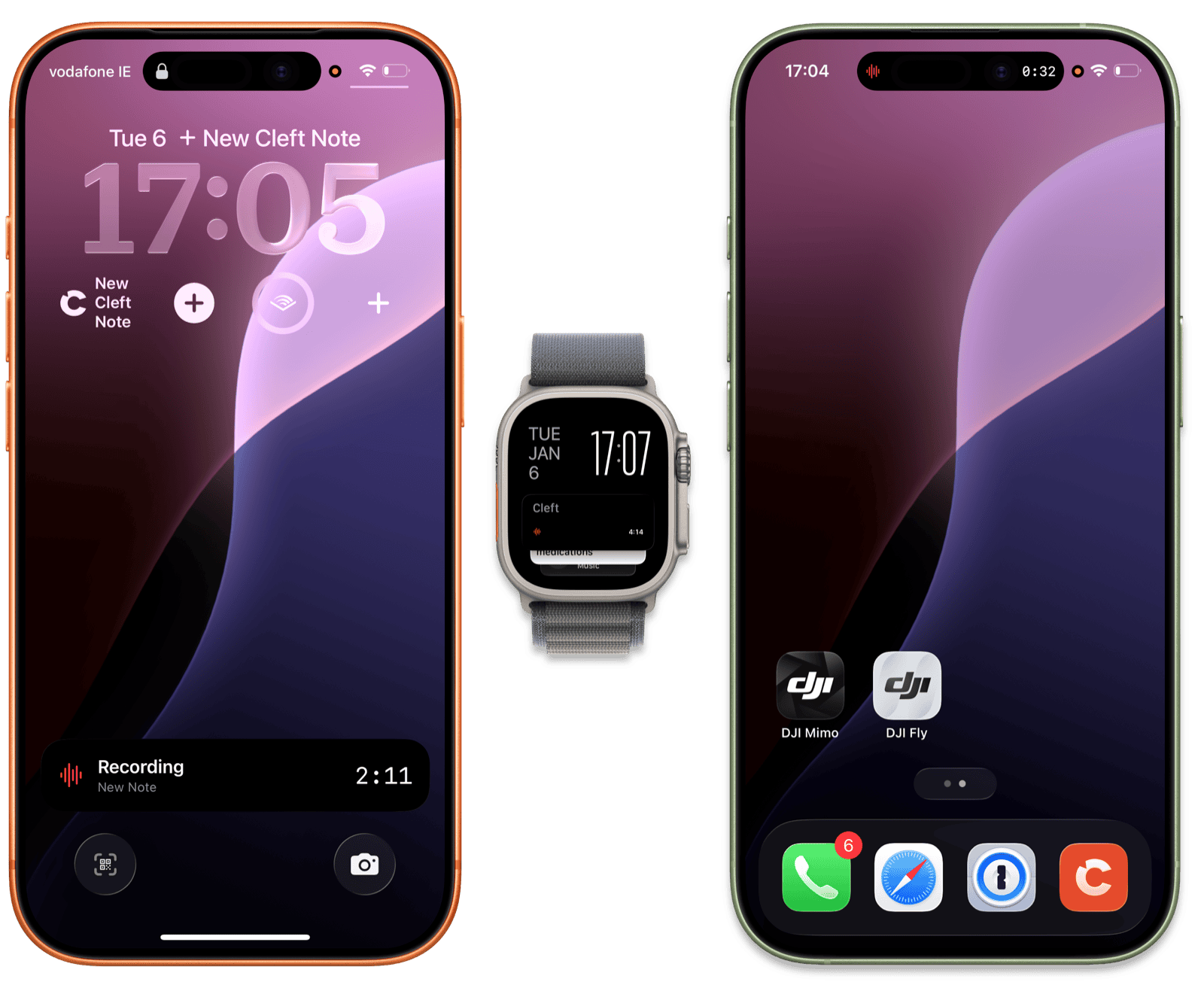
01: Lock screen
See your recording without unlocking.
A Live Activity timer shows on your lock screen the moment you start recording. Glance, see the elapsed time, keep moving. No need to unlock and surface the app.
- Lock screen timer. Elapsed time visible without unlocking.
- Tactile feedback. Feel each interaction.
- Widgets update instantly. Changes reflect right away.
02: Audio
Record on your watch with AirPods. Or Ray-Ban Meta glasses.
The Apple Watch app now records through any paired Bluetooth device, including AirPods, glasses, or an external mic. Quiet recordings come through clearer too, with low-volume audio normalised before transcription.
AirPods + Ray-Ban.Capture surfaces, expanded
- Watch + Bluetooth. Pair anything that runs Bluetooth audio.
- Quiet sounds clearer. Better gain handling on quiet rooms.
- Hover to learn. Long-press any icon to know what it does.
03: Accessibility
VoiceOver, touch targets, keyboard.
Three accessibility wins in one release: full screen reader support, larger tap targets across the app, and improved keyboard navigation throughout, including iPad.
- VoiceOver. Full screen reader support, including context menus. iOS · iPadOS · macOS
- Bigger touch targets. Buttons easier to hit, especially on smaller screens. iOS
- Keyboard nav. Improved keyboard navigation throughout, with better iPadOS focus. iPadOS · macOS
Highlights from the rest.
Improvements
- Reopen the iPad sidebar. Collapsed it? Bring it back with one tap.
- Login codes auto-fill. One-tap verification on iOS.
- iPad looks sharper. Tighter spacing, cleaner forms.
- Play unfinished notes. Listen while still processing.
- Cleaner clipboard paste. Strips formatting automatically.
- Recording dividers. See where each session starts.
Fixes
- Offline notes finally sync. Made a note without wifi? It uploads on reconnect.
- No more stuck spinners. Reconnecting is instant now.
- Filters work reliably. Pick a tag, see matching notes.
- Bluetooth mic selection. Smoother device selection.
- Deleted notes stay deleted. No more ghost notes.
- Mac play button. Click play, it plays.
- Background transcription retries. Retries automatically on hiccup.
- Fewer crashes. Playback, Settings, and elsewhere.
Thanks to Andy A, Grant, Mike L, Nigel, Rich P, Solange for testing this release and reporting the edges.
Read the complete v1.10.2 changelog for every shipped change, build number, and guide link.